I can share the file… need help…
1 Like
Yes you can share your part file
1 Like
We need the file or explanation what kind of problem you are experiencing. 
1 Like

Can you share your Fusion file. I see a lot of adaptive processes, not sure why you need so many. I see an error when you have a pocket process, but I am not seeing any pockets on the part.
1 Like
can not post, will not let me
file
(Attachment FB-1001_Edited v2.f3d is missing)
pass FB-4321
So it appears to me you are trying to use the pocket to remove all of the material between the ribs. I would suggest you use 2D contour to finish one internal rib, then use a linear pattern. You would not need to setup multiple work offsets, but you could run each process and do it 7 times, then do the next operation, etc. Here is a video where he shows how to use patterns to run one process, I hope I am explainining what I would do to remove and finish the material in those ribs. https://www.youtube.com/watch?v=gOJlBeE808E
1 Like
ok, so how do i make it to do just along the top of slots, or just in between the slots? I would like to do that and then do the ends…
I threw together a part that appears similar to yours. It has some ribs between two faces. I faces off the two ends leaving material remaining to machine the grooves. I created the paths to machine one groove, using contour versus adaptive, since there were two different contours in the ribs. one was so deep the other contour went thru… After proofing the two process ( you can add more, such as a finishing contour, etc.), I then created a pattern and the edit screen to the right shows how I set that up. It would run the pattern with a tool priority.
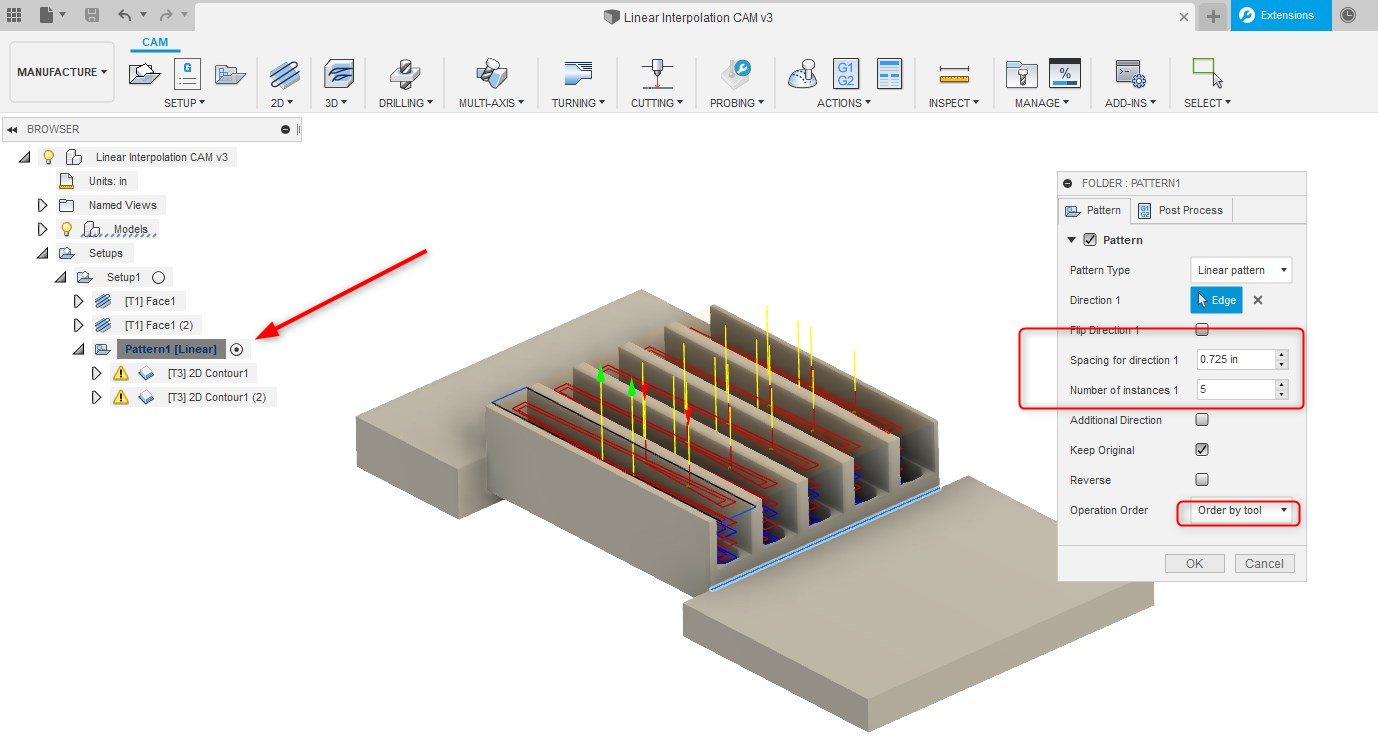
The following video link shows that you create a pattern in the setup button. I stopped the video short of machining all the ribs, you should be able to see the flow from this video. Of course, I would have tweaked it to improve finishes, geometry, etc, this was a 5 minute draft to show how to use patterns in the CAM process
1 Like