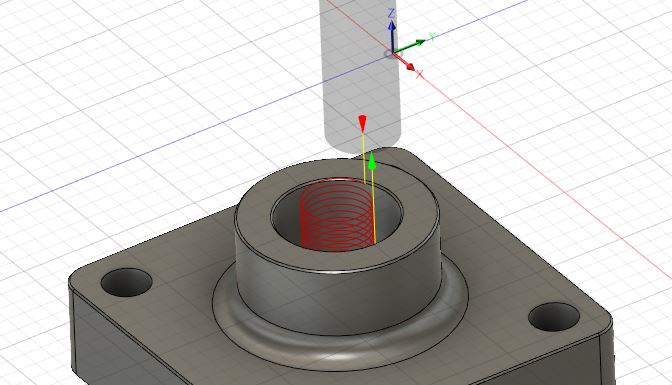
I created a random part on my own to experiment with. I am using a 3/8" end mill to helical bore a 3/4" diameter hole in the middle all the way through the part.
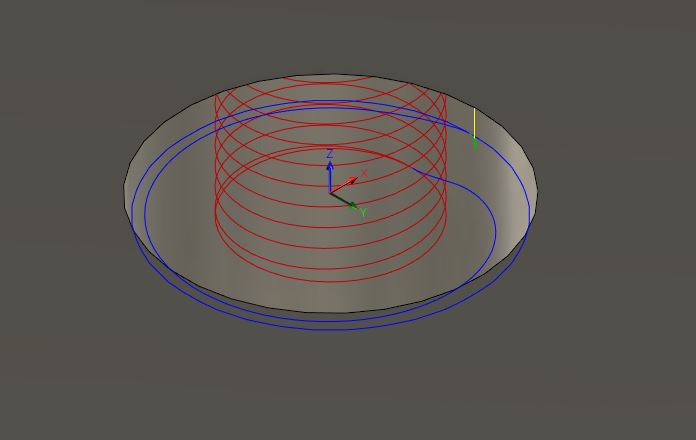
For some reason the tool path is creating an extra wider loop at the bottom of the cycle. I figured it had something to do with the Geometry selection, but I can’t get it to go away after multiple attempts. Any ideas?

1 Like
Did you try simulating it. On a helical pocket it usually goes to the bottom of the pocket and then Works its way out to the diameter of the pocket.
Looks good from my house. The bottom of bore doesnt appear flat. SO the radius of the ball endmill is trying to match your geometry as best as possible. The last loop is either a “finish pass” or just the final pass to leave whatever amount you asked for in the "stock to leave.
If this was my job/part. Id rough the part with a bull nose, Finish were I can with the same bullnose ( same radius as the fillets if possible.) Then finish the bore Walls and bottom with a 3D strategy if the ball end mill does not match the Rad. of the bore bottom.
When machining off a CAD model sometimes forget about the fillets and chamfers. Remember your tooling is also going to be able to form those features. IE the OD of the boss on your part.
While on the other hand the bottom of the bore has fillets that have created a radius. That is different and will need to generated or machined not just formed by the tool shape.
I bet a 6mm ball end mill with a 3d addaptive would make your tool path cleaner and more of what you need to do.
I suggest 6mm because it is just smaller that 1/4in and can swing(G2 G3 moves) an 1/8rad rather than form in.
But like ive come to learn there is NO single Right way to approach a job so, keep trying something new until you render something close to the part and go.
GOOD LUCK!
2 Likes
did you click finish at final depth
@Rumpelstiltskin - I always run simulations and this is essentially a bore, not a pocket.
This extra wider loop shows up at the end of the cycle and somehow it does not generate a red strike when it gets wider, but if it deviates from the tighter central helical it DEFINITELY WILL gouge something.
@MikeJones86 - I don’t see that setting anywhere
@Bill-Mutert
I know in Inventor its in your Passes Tab in The Multiple Depths
Says “Finish At Final Depth Only”
Pretty sure Fusion will have it in a similar spot
2 Likes
@MikeJones86 - I had used a 2D Adaptive Clearing process
This fixed itself as soon as I changed it to BORE
Thanks
2 Likes
Great job!
Whatever works, works!
remember there is no EXACT way to achieve the same result in machining.
3 Likes
That’s one thing I have learned over my 10 years. So many different ways to achieve the same end goal. Just take in all the information from as many sources if you can. Then adapt those into your own way that works, but never get relaxed. Always strive for a better product or faster toolpath than anyone else or other shop.
3 Likes
