Hi Friends,
I’m learning CAM using Fusion 360. I’m trying to rough the stock using 2D Adaptive clearing with a 16mm flat end mill. But Fusion keeps telling me that there is no valid toolpath from my configurations. I tried altering the passes, linking, geometry but unable to find where I’m making mistake. File link https://a360.co/2KYNY7m (file updated with 2D Adaptive)
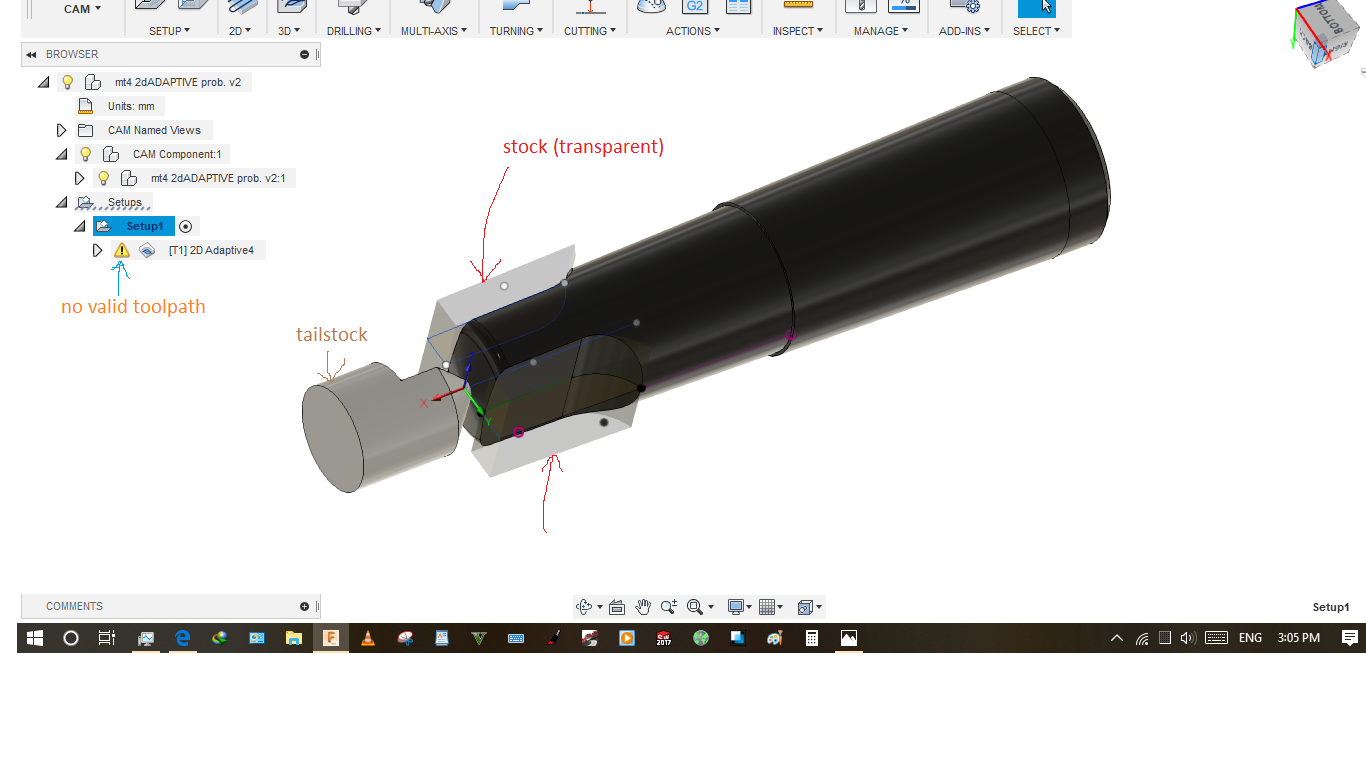
Thanks.
2 Likes
Try changing the ramp. I find a lot of empty tool path are because the ramp strategy needs to be changed.
2 Likes
Tried it but didn’t work.
2 Likes
I wouldn’t use 2D adaptive. You created a closed contour and the tool is too big to machine that feature as constrained. I changed to a 2D contour, multiple depths, with finish pass. You have to press the alt key when you select your geometry, if you use the geometry that you created your stock body.

5 Likes
Worked like charm. I’ve used 2D Adaptive with multiple stepover for max tool contact. Thank you sir.
1 Like